Visual Gesture & SerenadeVisual Scene
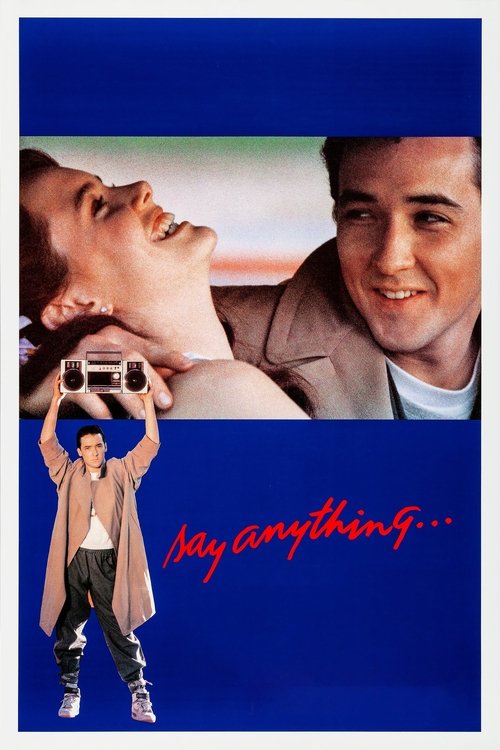
Say Anything...(1989)
Lloyd Dobler holding a boombox overhead playing Peter Gabriel is an unmistakable romantic cinema moment.
User Scene Memory
“A guy holds a boombox outside a window at night”
Describe a scene, clip, or visual moment - the action, setting, costume, or prop - and our AI identifies the movie from TMDb data instantly.
This page is a dedicated scene description search engine for anyone who remembers a visual moment from a film but cannot recall the title. Unlike generic search engines that return listicles, our AI reads the semantic meaning of your scene description - the action, the setting, the visual details - and compares candidate titles with movie metadata from TMDb.
How it works: Describe one visible moment, then add its setting and one concrete visual anchor. The application uses those clues to rank candidate films and checks the candidates against TMDb movie records. A result is a lead to review, not proof that every scene has a unique answer.
Use this page when you remember a visual moment, saw a clip, or have a screenshot memory. The prompts below are illustrative examples, not real user submissions or guaranteed matches.
A guy holds a boombox outside a window at night.
A statue head rolls through a city street during an attack.
A child sees people nobody else can see in his house.
A creature crawls through caves while chasing a ring.
A woman in a yellow suit fights with a sword in snow.
A hallway bends and rotates during a dream fight.
A family eats dinner while hiding from sound-hunting creatures.
A man dances alone down city stairs in a red suit.
A car chase happens while a bus cannot slow down.
Two people kiss while the ship sinks in the background.
Use it when the strongest memory is visual: an action, location, object, costume, lighting pattern, or silent moment. Use the plot page when you remember the story arc; use the quote page when dialogue is the main clue.
Write: [who or what] + [visible action] + [location] + [one visual anchor]. Keep uncertain actor, year, and genre guesses separate from the details you actually saw.
Input: A man holds a boombox outside a window at night while trying to win someone back. This is an illustrative prompt, not a real user submission or a guaranteed answer.
It can rank candidates from visible actions and context. It cannot inspect an image you have not uploaded, recover exact cinematography from a vague feeling, or guarantee that a remembered scene belongs to a movie rather than a show, trailer, or music video.
Candidate titles are checked against TMDb details returned by the application, including title, release year, overview, and poster data. Compare those details with your memory, then refine the search if the setting or action does not line up.
Describe one visual moment or action. What is happening on screen?
Mention where it happens: a rooftop, a forest, a courtroom, a spaceship.
Add a costume, prop, color, or vehicle that makes the scene unmistakable.
Try: "A guy holds a boombox outside a window at night."
These reference cases demonstrate how a single visual anchor—a boombox held in the rain, an antique wall portrait, or a highway confrontation—translates into a confirmed movie title.
Lloyd Dobler holding a boombox overhead playing Peter Gabriel is an unmistakable romantic cinema moment.
User Scene Memory
“A guy holds a boombox outside a window at night”
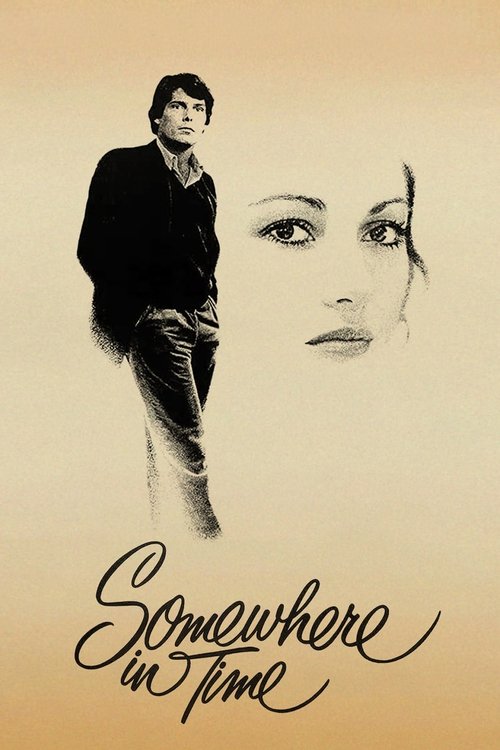
Grand Hotel portrait combined with antique pocket watch anchored this romantic fantasy classic.
User Scene Memory
“Love time necklace dress painting in wall of house actress Jane Seymour”
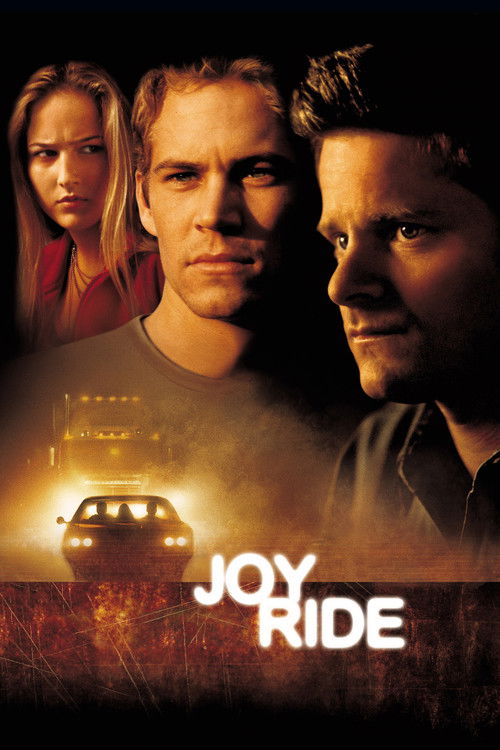
The CB handle 'Candy Cane' and 18-wheel trucker pursuit formed a distinct thriller fingerprint.
User Scene Memory
“18wheel truck driver, kills a man in a motel, car chase, cb handle is candy cane”
A guy holds a boombox outside a window at night.
Top match: Say Anything
A statue head rolls through a city street.
Top match: Cloverfield
A child whispers 'I see dead people' at home.
Top match: The Sixth Sense
A creature crawls through caves chasing a ring.
Top match: The Lord of the Rings
A hallway bends and rotates during a dream fight.
Top match: Inception
A woman in a yellow suit fights with a sword.
Top match: Kill Bill
A family eats dinner in silence while hiding from creatures.
Top match: A Quiet Place
A man dances alone down city stairs in a red suit.
Top match: Joker
A car chase with a bus that cannot slow down.
Top match: Speed
Two people kiss while the ship sinks in the background.
Top match: Titanic
A man in a mask fights his father's killer in the snow.
Top match: The Revenant
A woman in a blue dress steps out of a car in the rain.
Top match: The Matrix
Different scene types carry different search signals. Here is how to describe each type effectively.
Action scenes are defined by movement and setting. "A car chase through a tunnel with a bus that cannot slow down" is more distinctive than a generic action label. Describe the vehicle, the environment, and the stakes. A hallway fight, a rooftop pursuit, or a sword duel in snow each carry enough visual specificity to identify the film. The key is to name the type of action plus one setting or prop detail.
Quiet scenes are often the most memorable: a couple saying goodbye at an airport, a father teaching his son to ride a bike, a woman standing at a graveside. These scenes work because they are tied to specific locations and emotional beats. Describe the physical setting - a doorway, a train platform, a hospital bed - and the relationship between the characters. Spatial detail separates one tearful goodbye from another.
Twist scenes are powerful search targets because they are unique. "A hallway bends and rotates during a dream fight," "the camera reveals the planet was Earth all along," or "a character discovers they are a ghost" are one-of-a-kind moments. Describe what the camera shows and what the audience realizes. Spoilers are fine - the goal is identification, and a twist scene is often the most distinctive image in the entire film.
Sometimes the strongest memory is an object: a yellow tracksuit, a glowing briefcase, a red violin, a golden ring. Production design is deeply catalogued, so a single distinctive visual element can separate your target film from dozens with similar plots. Describe the object, who is holding or wearing it, and the scene around it. "A woman in a yellow suit fights with a sword in snow" is a useful search prompt for Kill Bill, but the returned details still need to be checked.
The question "what movie is this?" feels impossible when the title is gone. But a scene memory, a visual detail, or a screenshot in your mind can be enough to start. Here is a step-by-step method that turns a fragment into a confident identification.
Before you write anything, ask yourself: what is the single clearest image in your head? It might be a man holding a boombox, a child whispering to thin air, or a hallway folding in on itself. Pick that one image and make it the centerpiece of your search. Trying to describe everything at once dilutes the signal. One vivid scene, described precisely, outperforms a vague summary of the entire film.
People often write "it was really intense" or "it felt sad." Those emotions are real, but they are not searchable. Translate the feeling into an action: instead of "a scary scene," write "a creature crawls on the ceiling while the family hides below." Instead of "a sad ending," write "the couple says goodbye at an airport and he watches her plane leave." Actions are concrete, and concrete descriptions are what the AI can match against real film data.
Alongside the action, include one visual detail that makes the scene unmistakable. This could be a costume (a yellow tracksuit, a red leather jacket), a prop (a boombox, a glowing briefcase), a location (a rooftop at night, a snowy forest), or a color palette (everything is blue and cold). Visual anchors are powerful because production design is deeply catalogued. A single distinctive visual element can separate your target film from dozens of movies that share a similar plot.
If you know the genre, the decade, the country of origin, or the language, append it. "A 1990s American drama" or "a recent Korean thriller" are context tags that dramatically narrow the field. Even uncertain context helps: "I think it was animated" or "it felt like it was from the 2000s" gives the AI a useful frame. You do not need to be right about every detail - the AI weighs all clues together.
A miss is not a dead end. It is information. Use these troubleshooting strategies to refine your scene description and close in on the right film.
If your first search led with a character description and got no match, try leading with the setting instead. "A movie set in an abandoned amusement park" might surface a title that "a movie about a lonely security guard" did not. The AI evaluates every clue, but the first phrase carries extra weight. Changing which detail you put first changes which dimension the search prioritizes.
If you included an actor name, a year, or a plot detail you were only half-sure about, strip it out. A single wrong clue can derail an otherwise perfect search by pulling the results toward the wrong film. Try a leaner description with only the details you are certain of: the scene you saw, the action that happened, and one visual element.
If the scene search keeps missing, your memory might be better suited to a different entry point. If you remember a line of dialogue, switch to Movie Quote Search Engine. If you remember the story arc, switch to Find by Plot. Each tool reads your memory through a different lens.
Sometimes your brain merges two films into one memory - a scene from one movie glued to a character from another. If the results feel contradictory (the top match has the right scene but the wrong tone), run two separate searches: one for the scene and one for the character. You may discover you were remembering two different films all along.
Write one or two sentences about the visual moment you remember - the action, the setting, and one detail like a costume, prop, or color.
Yes. Describe the key action, setting, and visual detail shown in the clip. Even a five-second moment can be enough.
Yes. Describe the image: who is in it, the setting, the costume, a prop, the color palette, or the camera angle.
It is a tool that takes your natural-language description of a movie scene and matches it against real film data to identify the movie.
A single visual anchor - a yellow tracksuit, a glowing briefcase, a snowy forest - can be enough. Describe the detail and add any action or setting you can.
Yes. Describe the location: a rooftop at night, an abandoned hospital, a rainy neon street. Setting is a strong search signal.
Yes. Mention the costume, prop, or object and how it was used. A red violin, a glowing cube, a yellow tracksuit - these are high-signal clues.
Vague is fine. Even 'a guy dances down stairs in a red suit' works. Add one more detail - the mood, the era, or the setting - to sharpen the match.
Yes. Name the dominant colors or style (e.g., 'pastel 70s look' or 'high-contrast noir') plus one scene clue.
Describe the clip's key action, characters, and setting. Add any text, audio, or platform vibe if it helps (e.g., 'TikTok horror short').
Yes. Spoilers are okay. Summarize the final reveal or how the story ends as a scene description.
Usually within a few seconds.
If you remember a line of dialogue, use Movie Quote Search Engine. If you remember the whole story, use Find by Plot.
Real User Memory Input
“A guy holds a boombox outside a window at night”
A single unmistakable visual composition—boombox overhead in the dark—is one of cinema's most famous romantic gestures, matching without needing actor names.
Real User Memory Input
“A guy holds a boombox outside a window at night”
A single unmistakable visual composition—boombox overhead in the dark—is one of cinema's most famous romantic gestures, matching without needing actor names.
Focus on one memorable visual moment - what is happening on screen (e.g., 'dancing in the rain' or 'a car chase through a tunnel').
Mention one distinctive detail: a costume, a prop, a color, a vehicle, or a location. A single anchor separates your film from dozens with similar plots.
Even 'a guy dances down stairs in a red suit' gives the search a starting point. Add one setting or object detail when you can.